
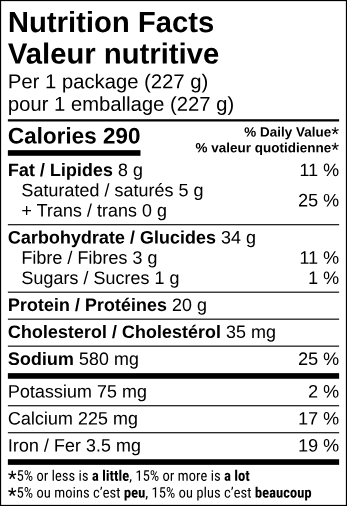
Nutrition Facts table
Enter your serving size and the nutrient values for one serving. The generator rounds each value, calculates the % Daily Values and draws the bilingual table in Health Canada's format.
Make a Nutrition Facts table/ Free tools for Canadian food labels
Draft a bilingual Nutrition Facts table and get the right front-of-package symbol for your package. Free, no account, and your product information is never stored.
The tools
Enter your serving size and the nutrient values for one serving. The generator rounds each value, calculates the % Daily Values and draws the bilingual table in Health Canada's format.
Make a Nutrition Facts table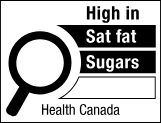
Answer four questions about your product and package, choose the “High in” nutrients, and download Health Canada's symbol at the right size for your front panel.
Get your FOP symbolHow it works
Serving size and nutrient values for the Nutrition Facts table; package size and “High in” nutrients for the FOP symbol.
See the table or symbol at its printed size, with the Health Canada format it follows.
Download SVG or 600 dpi PNG artwork, then have a professional verify your label before you print.
Built on Health Canada's documents
Tables follow the Directory of Nutrition Facts Table Formats and match the printed sizes of Health Canada's templates. % Daily Values come from the Table of Daily Values (2022). FOP rules follow the Front-of-package nutrition symbol labelling guide, and the symbols are Health Canada's own artwork from the Compendium of Nutrition Symbol Formats.
When the tool doesn't have enough information, it says so instead of guessing. Read the labelling FAQ.
Before you print
These tools make drafts from the values you enter. A Nutrition Facts table must be factual and correctly calculated, so have it checked against your recipe, formulation or lab results before it goes to print. Nexsure's label review takes a few simple steps and a nominal fee.
Questions
Is it free? Do I need an account? Yes, it's free, and no account is needed.
Is the table ready to print? It's a draft. The owner of the product is responsible for the values, so get it verified before printing.